Link: Modern C++ (Lecture & Tutorials, 2020, Vizzo & Stachniss) - University of Bonn ↗
CMake|Build System|library#
✅ Modern C++: The Basics (Lecture 0, I. Vizzo, 2020) ↗:简单的 Linux 和 Cpp 历史和教程
✅ Modern C++: Build and Tools (Lecture 1, I. Vizzo, 2020) ↗:学习了 cpp build system 整个流程(包括使用 cmake 生成 makefile 以及 CMAKE 的语法)、静态库/动态库(lib*.a 与 lib*.so)
# 可以自己写 library 然后自己追加
# compile modules
c++ -std=c++17 -c tools.cpp -o tools.o
# organize modules into libraries
# "ar rcs libname.a module.o module.o ..."
ar rcs libtools.a tools.o <other_modules>
# link libraries when building code
c++ -std=c++17 main.cpp -L . -ltools -o main# Use CMake to simplify the build
# CMakeLists.txt
cmake_minimum_required(VERSION 3.1)
project(first_project)
set(CMAKE_CXX_STANDARD 17)
set(CMAKE_CXX_FLAGS "-Wall")
# 这个命令可以将构建系统的整个脚本过程输出到当前目录下
set(CMAKE_EXPORT_COMPILE_COMMANDS ON) # important!
# tell cmake where to look for *.hpp *.h files
include_directories(include/)
# create library "libtools"
add_library(tools src/tools.cpp) # create libtools.a
# add executable main
add_executable(main src/main.cpp) # main.o
# tell the linker to bind these objects together
target_link_libraries(main tools) # ./main# Build a CMake project (Build process)
cd <project_folder>
mkdir build && cd build
cmake ..
makestrtok|stringstream#
✅ Modern C++: Core C++ (Lecture 2, I. Vizzo, 2020) ↗
#include <iomanip>
#include <iostream>
#include <sstream>

using namespace std;

int main() {
  stringstream filename("00205.txt");

  int num = 0;
  string ext;

  // Split the string stream using simple syntax
  // 而不是使用 strtok 来分割字符串
  filename >> num >> ext;

  cout << num << endl;
  cout << ext << endl;

  return 0;
}
int main(int argc, char const *argv[]);
argc defines number of input parameters
argv is an array of string parameters
By default:
argc == 1argv == "<binary_path>"
C++ Functions#
✅ Modern C++: C++ Functions (Lecture 3, I. Vizzo, 2020) ↗
C++ 17 可以像 Python 返回多个类型一样,返回多种值了 —— tuple
#include <iostream>
#include <tuple>
using namespace std;

auto Foo() {
  return make_tuple("Super Variable", 19);
}

int main() {
  auto [name, age] = Foo();
  cout << name << " is " << age << " years old." << endl;
}WARNING: Never return reference to locally variables!!!
#include <iostream>
using namespace std;

int& MultiplyBy10(int num) {   // retval is created
  int retval = 0;
  retval = 10 * num;
  cout << "retval is " << retval << endl;   // 加上这行代码后,g++ -O3 test.cpp -o test 就可以正常工作;反之则输出乱数
  return retval;
} // retval is destroyed, it's not accesisble anymore

int main() {
  int out = MultiplyBy10(5);
  cout << out << endl;
  return 0;
}返回了一个指向已经被销毁的内存位置的引用,访问这个引用会导致未定义的行为。g++ -O3 test.cpp -o test 则会输出错误的值,不加 -O3 则正常,或者说在方法中加个 cout 输出则也正常。
Static:发生在「编译」时
Non-Static:发生在「运行」时
inline function#
functioncalls are expensive…- If the function is rather small, you could help the compiler.
inlineis a hint to the compiler- should attempt to generate code for a call.
- rather than a function call.
- 总结:当函数足够小的时候,可以用
inline来内联函数,帮助编译器为你优化它 —— 即当函数调用时,直接将代码放(替换)到对应位置,而不是调用。
Check it out: https://godbolt.org/z/EGd6aG ↗
Good C++ Practices#
- Break up complicated computations into meaningful chunks and name them.
- Keep the length of functions small enough.
- Avoid unecessary comments.
- One function shouldl achieve ONE task.
- If you can’t pick a short name, then split functionallity.
- Avoid macros: If you must use ig, use ugly names with lots of capital letters.
C++ Namespace#
- Helps avoiding name conflicts
- Group the project into logical modules
Avoid using namespace <name>:好比写算法时总是使用 using namespace std;,这是需要避免的!
#include <cmath>
#include <iostream>

// Avoiding!!!
using namespace std;  // std namespace is used

// Self-defined function power shadows the std::pow
double pow(double x, int exp) {
  double res = 1.0;
  for(int i = 0; i < exp; i++) {
    res *= x;
  }
  return res;
}

int main() {
  cout << "2.0 ^ 2 = " << pow(2.0, 2) << endl;
  return 0;
}C++ STL Library#
✅ Modern C++: The C++ STL Library (Lecture 4, I. Vizzo, 2020) ↗
Size of container (C vs. CPP)#
int data[6];
size_t data_size = sizeof(data) / sizeof(data[0]);std::array<int, 6> data_{};
cout << data_.size() << endl;Clear elements (C vs. CPP)#
char letters[5] = {'a', 'e', 'i', 'o', 'u'};
memset(letters, 0, sizeof(letters));std::string letters_{"aeiou"};
letters_.clear();Iterating over maps#
New in C++17
std::map<char, int> _dict{{'a', 17}, {'b', 3}};
for(const auto& [key, val] : _dict) {
    cout << key << val;
}C++ Iterators#
C++ Algorithm#
sort(v.begin(), v.end())find(v.begin(), v.end(), val)fill(v.begin(), v.end(), -1)count(v.begin(), v.end(), val)count_if(v.begin(), v.end(), [](int x) {return x % 3 == 0;})for_each(v.begin(), v.end(), [](const int& n) {cout << " " << n;})rotate(v.begin(), v.begin() + 2, v.end())transform(v.begin(), v.end(), [](char ch) { return std::toupper(ch); })accumulate(v.begin(), v.end(), 0)max()min_element(v.begin(), v.end()):*min_element(v.begin(), v.end())auto [min, max] = minmax_element(v.begin(), v.end())- …
C++ Utilities#
✅ Modern C++: I/O Files, Intro to Classes (Lecture 5, I. Vizzo, 2020) ↗
C++ includes a variety of utility libraries that provide functionality ranging from bit-counting to partial function application.
These libraries can be broadly divided into two groups:
- language support libraries
- general-purpose libraries
Language support#
Type support(std::size_t)
Dynamic memory management(std::shared_ptr)
Error handling(std::exception,assert)
Initializer list(std::vector{1, 2})
Much more …
General-purpose libraries#
Program utilities(std::abort)
Date and Time(std::chronologically::duration)
Optional, variant and any(std::variant)
Pairs and tuples(std::tuple)
Swap, forward and move(std::move)
Hash support(std::hash)
Formatting library (coming in C++20)
Much more …
Much more utilities#
Just spend some time looking around: https://en.cppreference.com/w/cpp/utility ↗
Error handling#
跳过,不建议使用
We can throw an exception if there is an error.
std::exception
To use exceptions: #include <stdexcept>
An exception can be “caught” at any point of the program (try - catch) and even “thrown” further (throw)
The constructor of an exception receives a string error message as a parameter.
This string can be called through a member function what()
Intuition
Only used for “exceptional behavior”
Often misused: e.g. wrong parameter should not lead to an exception.
🔥 GOOGLE—STYLE: Don’t use exceptions.
Link: https://en.cppreference.com/w/cpp/error ↗
I/O Library#
read/write file#
Use streams from STL
Syntax similar to cerr, cout
#include <fstream>

using std::string;
using Mode = std::ios_base::openmode;

// input
std::ifstream f_in(string& filename, Mode mode);

// output
std::ofstream f_out(string& filename, Mode mode);

// in_output
std::fstream f_in_out(string& filename, Mode mode);There are many modes under which a file can be opened.
| Mode | Meaning |
|---|---|
| ios_base::app | append output |
| ios_base::ate | seek to EOF when opened |
| ios_base::binary | open file in binary mode |
| ios_base::in | open file for reading |
| ios_base::out | open file for writing |
| ios_base::trunc | overwrite the existing file |
#include <fstream>
#include <iostream>
#include <string>

using namespace std;

int main() {
  int i;
  double a, b;
  string s;
  ifstream in("test_cols.txt", ios_base::in);
  while (in >> i >> a >> s >> b) {
    // ...
  }
  return 0;
}#include <iomanip>
#include <fstream>
using namespace std;
int main() {
string filename = "out.txt";
ofstream outfile(filename);
if(!outfile.is_open()) {
return EXIT_FAILURE;
}
double a = 1.23456789;
outfile << fixed << setprecision(20) << a << endl;
return 0;
}directory_iterator#
#include <filesystem>
#include <fstream>
#include <iostream>

namespace fs = std::filesystem;

int main() {
  fs::create_directories("sandbox/a/b");
  std::ofstream("sandbox/file1.txt");
  std::ofstream("sandbox/file2.txt");
  for (auto& p : fs::directory_iterator("sandbox")) {
    std::cout << p.path() << "\n";
  }
  fs::remove_all("sandbox");
  return 0;
}# 必须指定 c++ 17 才可以编译
g++ -std=c++17 test.cpp -o test"sandbox/a"
"sandbox/file1.txt"
"sandbox/file2.txt"#include <filesystem>
#include <fstream>
#include <iostream>
namespace fs = std::filesystem;
int main() {
std::cout << fs::path("/foo/bar/txt").filename() << '\n'
<< fs::path("/foo/.bar").filename() << '\n'
<< fs::path("/foo/bar/").filename() << '\n'
<< fs::path("/foo/.").filename() << '\n'
<< fs::path("/foo/..").filename() << '\n';
return 0;
}# 必须指定 c++ 17 才可以编译
g++ -std=c++17 test.cpp -o test"txt"
".bar"
""
"."
".."#include <filesystem>
#include <fstream>
#include <iostream>
namespace fs = std::filesystem;
int main() {
std::cout << fs::path("/foo/bar.txt").extension() << '\n'
<< fs::path("/foo/bar.").extension() << '\n'
<< fs::path("/foo/bar.png").extension() << '\n'
<< fs::path("/foo/.").extension() << '\n'
<< fs::path("/foo/..").extension() << '\n';
return 0;
}g++ -std=c++17 test.cpp -o test".txt"
"."
".png"
""
""const fs::path& p = "...";
fs::(exists(p));C++ Classes#
class glossary
- Class Definition
- Class Implementation
- Class data members
- Class Member functions
- Class Constructors
- Class Destructor
- Class setters
- Class getters
- Class operators
- Class static members
By default everything is private
Access members with a ”.”
GOOGLE—STYLE: All data must be private
What about structs?#
Definition starts with the keyword struct:
struct ExampleStruct {
    Type value;
    Type value;
    Type value;
    // No functions!
}struct is a class where everything is public
🔥 GOOGLE—STYLE: Use struct as a simple data container, if it needs a function it should be a class instead.
🔥 Always initialize structs using braced initialization, such as:
struct namedInt {
	int num;
    std::string name;
};

namedInt var{1, std::string{"hello"}};Const correctness#
const after function states that this function does not change the object
Mark all functions that should not change the state of the object as const
Ensures that we can pass objects by a const reference and still call their functions.
Substantially reduces number of errors.
Typical const error
#include <iostream>
#include <string>

using namespace std;

class Student {
 public:
  Student(string name) : name_(name) {}

  // This function *might* change the object
  const string& getName() { return name_; }
  // correct: const string& getName() const { return name_; }

 private:
  string name_;
};

void Print(const Student& student) { cout << student.getName() << endl; }如果不在 getName() 后面加上 const,那么编译器不能保证你不会改变它,除了 setter,一般都需要加上 const吗,这能很大程度上避免错误。
std::Move() semantics#
c++11 引入 move()
所有权转移,用于将左值显示转换为右值,允许通过移动(而不是复制)资源来优化性能。
Smart pointers#
- Smart pointers wrap a raw pointer into a class and manage its lifetime (RAII)
- Smart opinters are all about ownership
- Only use them with heap memory!
#include <memory>
C++ 11 Smart pointers types#
std::auto_ptr- 🔥
std::unique_ptr - 🔥
std::shared_ptr std::weak_ptr
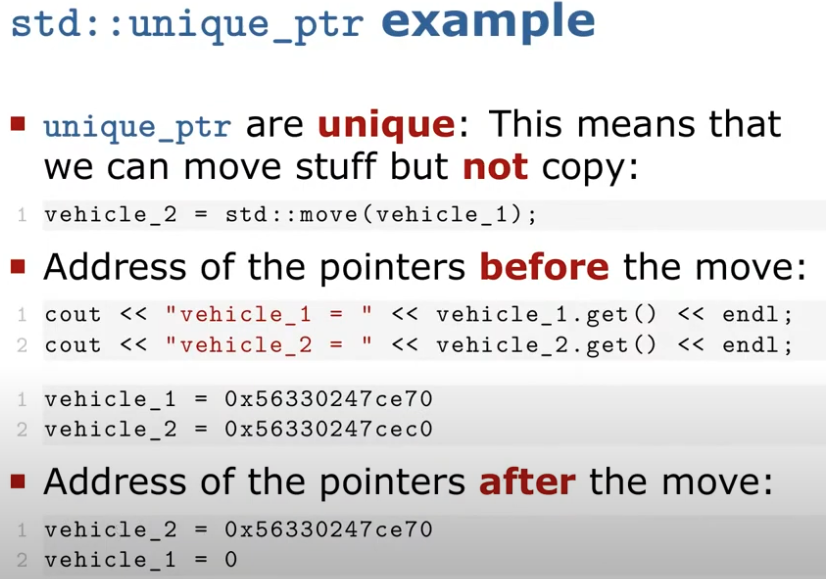
因为使用的是 unique,不能直接用 = 复制,但是可以转移所有权,那就使用
move()